
Lesson Learned: Always Backup Your Stuff to the Cloud 😰
Roundup: how a near catastrophic loss of data saved my rear; the apps I use for digital organization; an unexpected compliment; my new daily yet exhausting language-learning technique

I started this week feeling particularly invigorated and inspired, revved up by the response of my friends to me starting this blog/progress journal. I couldn’t wait to see how the week would go so I could share with you my exponential progress! Except on Monday morning, wide-eyed with coffee at hand, I discovered that 16 of the 36 pages of my book outline had completely vanished.

Japanese For Anyone (JFA)
A sort of disaster like that all comes down to data management, and rarely does one know how exactly an author goes about writing and organizing their book. What app(s) do they use, how is it sorted, where is it saved? I read Stephen King’s On Writing a while ago in hopes of finding that out, but he didn’t go into the detail I had hoped, noting that he used a typewriter for Carrie and had a board of notes above his desk for reference. The only way he could have lost 16 pages of his outline would be if someone had physically thrown them out.
I, on the other hand, have been using Word. I don’t like it much but I had watched some LinkedIn Learning videos on creating long documents in Word and thought that it would work (and double as a workplace-valuable skill to flaunt). I also didn’t really have a feasible alternative. I had once tried writing in TextEdit to avoid getting caught up with the page design and just spit words onto the page, but the final product was too ugly and inconsistent, thus too difficult to review and edit. Google Drive/Docs has an inefficient data management system that, to me, is not smooth or intuitive enough for my needs. So I was stuck with Word, which I believed was what every other author in the world was forced to use anyway.
In Word, I started making an outline in Outline view, filling in each section as detailed as possible. The LinkedIn Learning video recommended that I only have 3-4 “levels” of text (i.e. Chapter > Section > Subsection > Body Text), but mine wound up with 6-8. So last week when I decided to break the chapters into separate but linked documents (i.e. “long document format”), Word broke. There were odd section breaks and irreversible tab stops everywhere. But I figured, that’s just how it is in Word, and trudged on. I didn’t notice then that an entire section had vanished from the main outline view, until this Monday.
The little plus sign for “Topics” toggled to an empty bullet point, and not the meticulously organized sections filled with all of the relevant vocab and culture tidbits I had thought for so many drafts now to include. The Topics section was meant to follow the grammar and vocabulary Primer and show how the Primer contents could be used and supplemented to work in all these different daily situations, like ordering at a restaurant and asking to try on clothes in a store. It’s a challenging section to write because it’s easy to get bogged down in all of the specific expressions for those situations and have tens more words to learn that you can’t recycle in other situations. Wishing not to overwhelm the reader, I managed to figure out a way to present the new and specific vocabulary alongside the recyclable Primer vocabulary, but this relied on how I ordered it — and that was now all lost.
In my panic, I cried. There were no other saved versions to retrieve. Word didn’t have an error and close on itself, which would have created a retrievable auto-save document. Hours upon hours of work had just straight up vanished.
Sometimes this isn’t a bad thing. They say that the second time around is usually better than the first. And a part of me thought, perhaps I have lugged over this section of the book too much already and a fresh start might do it good after all. But the issue was, this isn’t the second try for me at writing my book or this section. It’s the fourth or fifth. And I was truly certain that this time, after all the trial and error of the previous drafts and realizing why I didn’t like them, this outline had it right.
So I took an hour to mourn my loss before digging back into the files on my computer again. And boy do I have a lot of those, bundled up in folders labeled indiscernibly like “Draft1” or “revamp 2022”. Document management for this book and my thoughts has always been hell, and I realized that this system I have, of all these separate documents and folders and this stupid Outline view on Word, sucks. I had to find something, anything, else.
I remembered that for one of my previous drafts, I used an app called Scrivener. It seemed like the perfect solution then, but I didn’t fully — or even partially, really — utilize its power because I skipped right through the tutorial. And skipping the tutorial of this awesome powerhouse app meant I was merely using it like a glorified Word, and so after that draft ended up not being to my liking, I switched back to the OG. Once again I had to learn my lesson.
I redownloaded Scrivener’s free trial just to test and make sure Word wasn’t the right one for me for sure. As I looked mournfully through my Word outline again mulling over how I’d migrate everything over, I noticed that the new section breaks the long document mode created linked to a folder that, although the source no longer appeared in the outline anymore, contained all of the individual sections of the “Topics” chapter. Thank. You. Jesus. A few clicks and there they were again! I was so relieved to have them back. Yet no matter what I tried, I could not get them to link back up to the outline I made in Word, and I now had nine additional and seemingly separate documents to fiddle with and cause more folder/organizational mayhem.
Back to Scrivener I went, first taking the time to go through the tutorial, then back to my Word outline, then spending the rest of my afternoon migrating those contents into the magical all-in-one system of Scrivener. In the end, the outline looked better than it did before and made more sense. Although the shock of almost having lost a huge section of my book hurt, I am so happy to now be using Scrivener again. No more effing around with Word.
The remaining pomos for JFA this week went to migrating the outline, adding notes, and reordering it all. Somehow and thankfully, Word being a true-to-form major pain in the arse ended up leading me to a better system that I luckily switched to before it was too late and too cumbersome to do so.
Pomos, OneNote, and my iPad Mini: How I digitally organize & plan everything
“Pomos” refers to a “pomo” which is shorthand for a “Pomodoro” which is Italian for “tomato” which refers to a particular method of time management called the “Pomodoro technique.”
Now I don’t know why a tomato is connected to time management either, but the idea is that your brain works best in concentrated spurts buffered by short breaks. The typical Pomodoro timer is 25 minutes of concentrated work offset by a 5 minute break, then repeat. On my app, TomatoOne, I set my spurt to 45 minutes. So one pomo = 45 minutes, two pomos is two 45-minute cycles, and so on. Instead of organizing my day by time (e.g. I wake up at 8, I study German from 8:30-9), I set goals for the morning and afternoon/evening and measure them in pomos. So I write something like this in my planner: AM. German. Pomo x 2. JFA. Pomo x 3. PM. Thesis. Pomo x 2.
This method works really well for me because I have never been able to adhere to a hour-based schedule. Something always gets in the way, or I wake up a bit too late, or even too early, or take too long to eat or don’t want to eat when I’ve planned to, blah blah, and once the plan is broken I tend to shuffle tasks off to other days. It’s much easier for me to fit a pomo in to do something and turn off my phone notifications for that whole period than it is to make a definite time frame that I might end up not having the energy for.
Another thing I use is OneNote. Like Scrivener, this was an app I had used in the past but didn’t fully utilize. This year I noticed how my coworker was using it to organize her tasks: she puts them in simple tables organized by month and marks or reorganizes them as she checks them off or moves them to other time periods or sections. Given how all-over-the-place my method of keeping my thoughts together has always been and desperate to fix that, I thought to retry using it especially because it syncs with all of my devices.
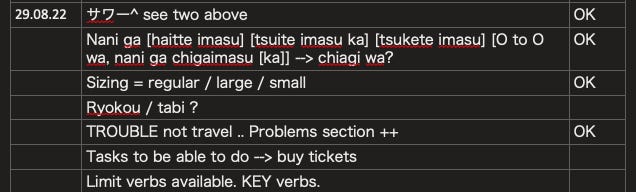
Now I have Notebooks for each project: JFA, MA Thesis, JFKInterviews (the student group I run at my university), ESMT (the business school I work at), etc. The first Page in each section is called “Log”, which contains a dated mind-dump table. The Log is where I track my thought process or idea-adding over time.
For example, today on the way to Soho House I might get an idea, which I jot down in my iPad GoodNotes notebook, and when I get home to my computer, I toss it into the Log of the corresponding category, so for example JFA, and give it a date. There’s another column on the right that I leave blank, and later when it’s pomo time for JFA, I will put that idea in the outline or wherever it needs to go and mark it OK in the Log to show that I had “completed” or addressed the task. It looks like this:
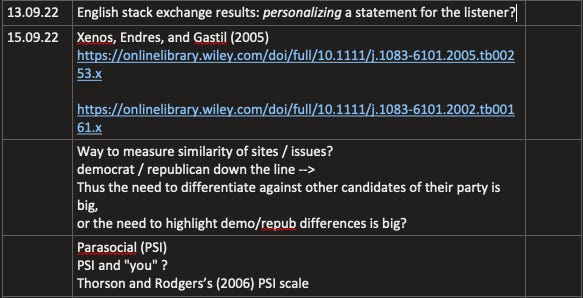
I’m also using the Log for my thesis, but there it looks a bit different. I have the same three columns, but because I’m still in the idea-development stage for the topic and research question(s), I mainly write my notes and ideas as I work through the pomo. It’s more of a stream-of-thought style. I plan on using the third column when I review my notes to mark which the best leads are for the topic/RQ.
And my iPad mini, being so cute and compact, can be taken anywhere, and so I’ve been using this “idea dump” and planner function of it far more than I did my larger iPad Pro. I don’t even use my Moleskine planner anymore. My iPad mini purchase was totally worth it.
MA Thesis
My goal this week was to have a topic sorted. Unfortunately, I didn’t accomplish this task nor did I dedicate enough pomos for it. This week in particular I’ve been busy at my part-time job at the business school, basically staring at the screen trying to learn and figure out Excel to make it do magic for me, so I could only work on it Monday and Wednesday. With the migrating of my book outline to Scrievener and emotionally recovering from the near-loss of my data, I had even less mental energy for my thesis.
I did find more interesting and relevant articles to reference, but the caveat is that I can see myself already “rabbit-holing.” This refers to my tendency to read and collect too many source materials without actually making progress on my own thesis/RQ. I have downloaded over 30 separate papers at this point and I know I need to recenter on what I want to write about and filter the paper collection accordingly before downloading anymore but… perhaps this is just how the brainstorming stage goes?
Either way, can’t let it go on much longer, because there’s the risk of the other tendency I have: “tail-chasing”, which refers to finding articles on the same topic and coming to the same conclusions about what I want to write about (or don’t) without, just like rabbit-holing, making actual progress on the thesis itself.
Work @ the Business School
Early in the week, there was a welcome event for the new Master of Management students that I and some of my coworkers attended. This is the class for which I am responsible for making their “profile books”, a process that entails getting all the students to fill out a survey then clean that data and format it to migrate from Excel into Word, making a final PDF we distribute to prospective employers and so forth.
In previous years, this task was a major undertaking. There’s 120-something students who all fill out the survey in their own unique formatting and style and a good chunk who don’t fill it out at all, so they have to be “chased” and reminded and their data collected all before the publication deadline. I was warned about it over the summer and secretly dreading the prospect of doing overtime to complete it.
But I was given almost complete control over the introduction email and survey formatting, so I took the liberty to use as many copywriting zinger techniques and a quirky writing style in to rewrite the email (and subsequent reminder emails) and reformat the survey so that there was as little room for error as possible, within the constraints of the survey software we were using, Qualtrics.
The result? A 100% response rate and a mostly clean survey dataset. Hot damn!
Now I was really excited about this, but what really was the cherry on top was that one of the new MIMs came up to the Career Services table at the event, introduced themselves, and asked, “So who wrote that excellent email?'“ referring to the introduction email I sent the entire class. I was so plussed about the compliment that I said, “Me!!” and he then went on to tell me how descriptive and helpful it was. Woohoo!
Then later in the week, I watched some more Excel tutorials on LinkedIn Learning and ended up coming up with a formula that would solve one of our most difficult Excel-to-Word data migration problems like magic. Man, I do love Excel (although it continues to kick my ass and be annoying and finicky). It’s so cool to create formulas that do all this dirty work for you. I absolutely refuse to do anything manually anymore, because it’s just too powerful of a program to excuse it, and no matter the task, take the time to learn the formulas and tricks now or so help me God.
Instagram also knows I like Excel videos (whose tips have been a great help to me IRL) and fills my FYP with them. I can almost guarantee you that a good chunk of my absurdly long list of Following accounts are now Excel-tip related and I’m not even mad about it. (This means yes, if you see any corny Excel-related merch like a shortcut mousepad or mug, I want it.)
Italy Citizenship
This week’s task was to complete the paperwork to obtain my mother’s birth certificate and sort out what needs to be done to obtain my grandmother’s. They share the same issue: names not being written correctly from vital record to vital record, which obscures the clear line of descent.
But with both my mom and grandmom having passed, it is difficult to obtain their documents. My dad, being a surviving spouse, could get my mom’s, but he could not get his mother’s. And without my mom’s birth certificate, I cannot get my own amended, which also suffers from an incomplete name (my parents’ middle initials are written, not their full middle name, which also somehow obscures the line of descent).
And my dad, love him, but he’s not reliable, and so I could not set him to do this task by himself. And with my brother having also passed and me being estranged from my sister who would likely know the other information I need to get the birth certificate, like my mom’s parents’ names, I had to dig online and eventually (luckily) get a hold of my only uncle on my mom’s side (who I haven’t spoken to in almost a decade) to fill out the details in the form.
By Friday, I managed to fill out the forms, instructed my dad to get a money order, made him send me his ID photos, and got it all together so all he would have to do is sign his name and stick it all in an envelope that not even him but my aunt would send out for me. Even that was a big hassle, but it is now done. Let’s pray now that they don’t ask questions and just send me my mom’s birth certificate!
Being abroad and collecting these papers means I have to rely on my aunt a lot, which I don’t like to do because it’s not her responsibility, but I am very thankful that she is helping because otherwise this would be impossible. And there’s still so many other documents to get, and all of them have cloudy timelines. Once I send in the request for my mother’s birth certificate, when will it come? Will they call my dad and inquire him? (God I hope not.) At any rate, it’s all in the works. One document at a time, they say…
German
I’ve set one pomo per day, in the morning, to study German. This involves going over my vocabulary notes and now listening to and repeating out-loud a video on B2 conversation.
Reading or repeating out loud is exhausting. It takes a lot more effort than just reading or listening obviously, but it is the most rewarding way to learn especially when you do it for the same audio/video multiple times. In some conversations this week I had in German, I noticed myself using words I had repeated from the video (and my textbook, for which this technique also works) because I could hear them in my head already.
And as tiring as this exercise is, I think I’ll continue with it this upcoming week for one pomo each morning, but I will need an extra pomo in the afternoon or evening on certain days to practice more grammar and review. I will need to take that B2 exam at some point, but I also just like being able to keep up with conversations with my now growing group of German friends without having to revert to English so much to talk about my work, projects, or social life. And for that I must continue training…
Week #1: A success!
I’m honestly glad Word almost lost my data. Moving to Scrivener was the best move and I think it’s going to make the writing process ahead even better, as it already has. I do need to dedicate more pomos to my book and thesis, though. It was hard this past week and likely will be this upcoming week because of the profile book project at work that takes all of my serious mental energy from the day, but hopefully once that task is completed I’ll be able to dedicate more post-work pomos to them.
In terms of socializing, I was also quite busy in my evenings, and I went to the gym twice, so all in all, I had a relatively productive week. I must say, I feel so much more confident about my abilities and having this blog helped with that a lot, so thank you for reading / subscribing. Til next week!
~Deanna
Crushed it! Can’t wait to see what’s up next week! 🫡